Thank you for dropping by. I hope you like my blog!
  Have a nice day!


 [Artworks] New DeviantArt Updates
Monday, August 4, 2014 | 9:00 AM |  8 comments
8 commentsOMG! This is my 2nd post for today.... OK.. too productive today lol. BUT, this post might be the last post before I start my hiatus since I'm 12th grader now, and... there are gonna be lot of stuffs to do.. such as homeworks, school projects, and shits. Haha, yall gunna miss me or not?

Anyway I'm still opening request for icons during hiatus
 Don't worry, making icons doesn't take long time!
It's been months since I uploaded my last deviation on my DeviantArt account. I have two new deviations I made for Manga Class final project at school. I'll be posting the drawings, hehe. Not that good actually, I'm soooooooo terrible at colouring. Goddammit, why can't my colorings be as perfect as those I watched on Youtube? Lels.
1st artwork :: Santa Ursula Manga Class Portfolio Cover
Portfolio Cover by pinkshoo on deviantART
I made this deviation after my final manga project as an additional project. Since I still had more free time at home, I decided to make a cover for my school's manga class portfolio.
Duhh the coloring looks so awkward, no matter how hard I tried to make it look more realistic. No matter how hard I tried to follow the awesome tutorials on Youtube. No matter... lol but I'm improving much better than before I can say. Take a look at my old drawings on my Deviantart, they are so horrible, lmao.
2nd artwork :: Manga Class Final Project
Desserts Maids by pinkshoo on deviantART
This maid twins drawing was made for final project last year
 The students were asked to make any kind of anime drawing, can be either manual or digital. I needed to practice more seriously to draw digitally so I decided to draw this in digital, hehe.
All the drawings I made with SAI Paint Tool
The students were asked to make any kind of anime drawing, can be either manual or digital. I needed to practice more seriously to draw digitally so I decided to draw this in digital, hehe.
All the drawings I made with SAI Paint Tool 
Late year of 2014, I plan on opening a drawing commission on Deviantart so that I can earn money from drawing! I'm going to practice real hard after the graduation and then try my first time opening an art commission, or maybe art trade with any professional artists! OMG hope my dreams come true...

Any question? Comment on this post.
Labels: Adorables, Anime, Art, Author's, Creations, deviation, Hobbies, Manga, Mine, School
Performances at Mall @Alam SuteraThursday, April 17, 2014 | 7:40 AM | 0 comments
0 commentsHello guys

I'm finally here to post a new entry about my last week's dance performance. ㅋㅋ I'm very excited to tell everything to you guys
 hehehe..!
The event is called EGGciting Easter and was held from March 28 until April 20 2014. Anyway, have I told you guys that I'm now taking hiphop course at O2 Dance School? Actually I had taken the course over a year ago but I quited for a while. Then I reregistered there because my friend was interested in joining the course, too, after watching a dance performance performed by our younger schoolmates. Yay, a comeback. After that, on March, I joined the breakdance class. I really don't know what makes me want to join that class because girls don't usually pick out that choice, haha. But it's interesting though. I've been a bboy fangirl, you know, and it's never wrong to try learning a bit of it.
My hiphop teacher, Kak Monche asked us to perform in that event on Saturday, April 5
It was okay at first until I realized that my breakdance teacher Kak Adit also asked his students to perform on Saturday, April 12. Ya! So that means I have to perform twice  I'm not really used to performing things... I have that stage-fever lol. I may forget everything I've remembered when I'm on stage. So I tried to calm myself a bit.
My hiphop crew, Leatheraux, was supposed to feel lucky because there were only 4 picked groups to perform in the event, and we can say we're still very basic among the other crews who performed. But once again it doesn't matter, though. It's pretty cool, actually. Despite the fact that I needed to wear neon costumes again, URGH. I just hate neon colors cuz they look terrible on me lol. I then borrowed a neon pink jacket from Fani, the oldest member in Lx. I tried to have it on myself eventhough it's a bit too small for me. Fani has a petite body, that's why

It was not my first performance. This one was the second after O2 Dance School's yearly event Ozone. And it was my third performance, if I include the first performance in Ozone 2 years ago. although I've performed more than once, I'm still not used to it

We performed pretty well. I did a mistake, yes. UGH not a big mistake actually, just an unrecognizable one. Haha! Plus, I was constantly seen busy with my snapback that's always going to take off by itself because it's loosened, phew.
Kak Monche couldn't attend the event cuz she was going to her relative's wedding party. So, another teacher, Kak Bogel was in charge to arrange the performance rundown.
The second performance was a week later. This time I would perform twice for hiphop and breakdance. My bboy crew, Break Beat was going to be the last performer that night. I was like aaaaaaa
 panic! I arrived at the spot like 4 hours earlier and practiced my choreos. The hiphop choreo was the same as the one before, just different blockings. What made me nervous the most was the choreo for breakdance perf. Oh, not that one! More exactly, my freestyle choreo
  I was extremely afraid of forgetting my set or worse, having my freeze crashed. Gooooddddd, I just want this to end already.
It ended. IT finally ended. The anxiety I had been holding for hours had finally been released. LOL I could loudly say that I was haaappppyyyyy after my last performance that day. Finally, finally, fnally, finally, finally.............
I was very happy when I could hear my friends were screaming my name very loudly to show support. They really boosted my self confidence. Oh, how I love you guys
 Plus, knowing that some hot guys were there too really made me delighted. OK sorry, just few cool boys I'm acquainted with...haha. After the performance, some young kids were giving us their hands, as if we're their idols, we don't even know them but we feel so excited to respond them.
I performed well. Hm, not really well actually after I watched the video my friend recorded for me. EWWW, I didn't even seem like dancing on the stage LOL I was THAT bad. OMG
 Hhhahahahahha.. well at least I did my best.. wait, not my best. My practice was actually way better than my perf on the stage. But what to do, hahaha if only I could turn back time, just a few mins ago, I'd perform better. huh.
BONUS pictures of me and my crews in the event, yay?!


YAY US! 
Some of my girl friends were fighting(?) to have a selfie with my brother LOL but I'd just come with pics of them with my brother together, plus me.


Just some selfies... ah! I finally took a selfie together with this handsomey kiddey Joel!


Yay, with Kak Monche! Look at her silly expression 

a selfie with the only lady in Break Beat!
Labels: Break Beat, Breakdance, Daily Life, Dance, Friends, Fun, Hiphop, Hobbies, Holiday, Leatheraux, Mine, People, Selcas
[Tutorial] How To Make a Gif Inside a Text Using Photoshop + Sharpening & ColoringWednesday, July 10, 2013 | 11:37 AM | 4 comments
4 commentsHello everyone!
I'm so addicted to making GIFs lately!
Now I'm gonna give you a step-by-step tutorial of making a GIF inside a text with Photoshop. It's not a new feature but pretty interesting fosho. Enjoy!1. Open the application Photoshop (I'm using Photoshop CS4) →
Open File → Import → Video Frames to Layers
Choose the video you want to edit. My PS version only supports MP4.

2. Select the length of the video you want to use. You're not gonna put the whole video, right XD

3. Crop your video using Crop Tool.
This isn't necessary anyway, but you MUST do this → Image → Size *set a new size*
The original video's width and length are indeed too big, you have to make it smaller.

4. Make a new layer above all the video layers.

5. Paint the new layer WHITE using Paint Bucket Tool. We are going to make the text here


6. Choose Horizontal Type Mask Tool. You might use the Vertical Type Mask Tool if you want to type your text vertically.
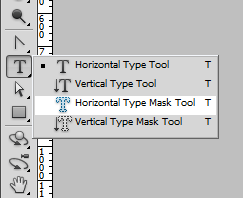
7. Type the text on the white layer we've created.

8. Select Move Tool and your text will result to this : *we are selecting the area to earse so you can see the animation behind*

9. Press Del(Delete) and the video frames behind will be shown up.

10. Now we're going to give a colour tone to our gif~! You may skip the colouring steps!
Create a new layer above the video layers, and below the white layer. In this tutorial, I'll use the color pink! I named the layer "Colour". It's result like below :

11. Change the mode of the layer into Color. Keep the opacity 100%.

12. Make another new layer below the white layer. Paint it black.

13. Change the mode into Color Burn *this give stronger colour tone to the gif* . Set the opacity as you like ^^

14. Now we are going to sharpen the gif! Follow the next following steps.
Choose Select All Frames.
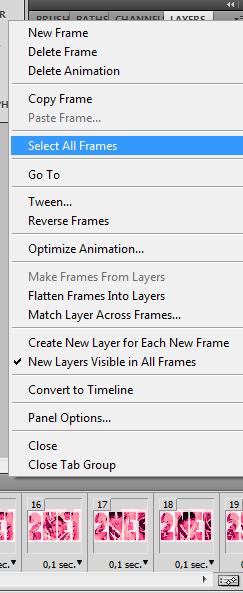
15. After selwcting all the frames, choose Convert to Timeline or simply click the button on the right bottom corner for shortcut.

16. The result will be like this :

17. Then choose Filter → Convert for Smart Filter

18. The result :

19. Choose Filter → Sharpen → Smart Sharpen or simply press Ctrl+F on your keyboard.

20. Set how sharp you want your gif to be.

21. Now, save our gif. Choose File → Save for Web & Devices

22. Click Save!

Sample results :
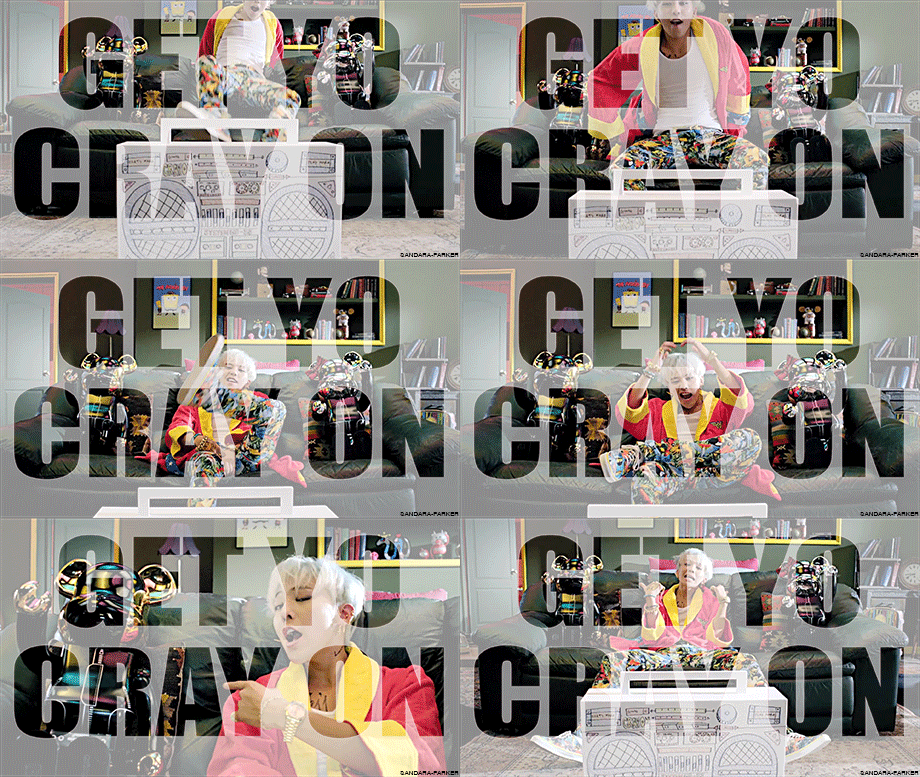
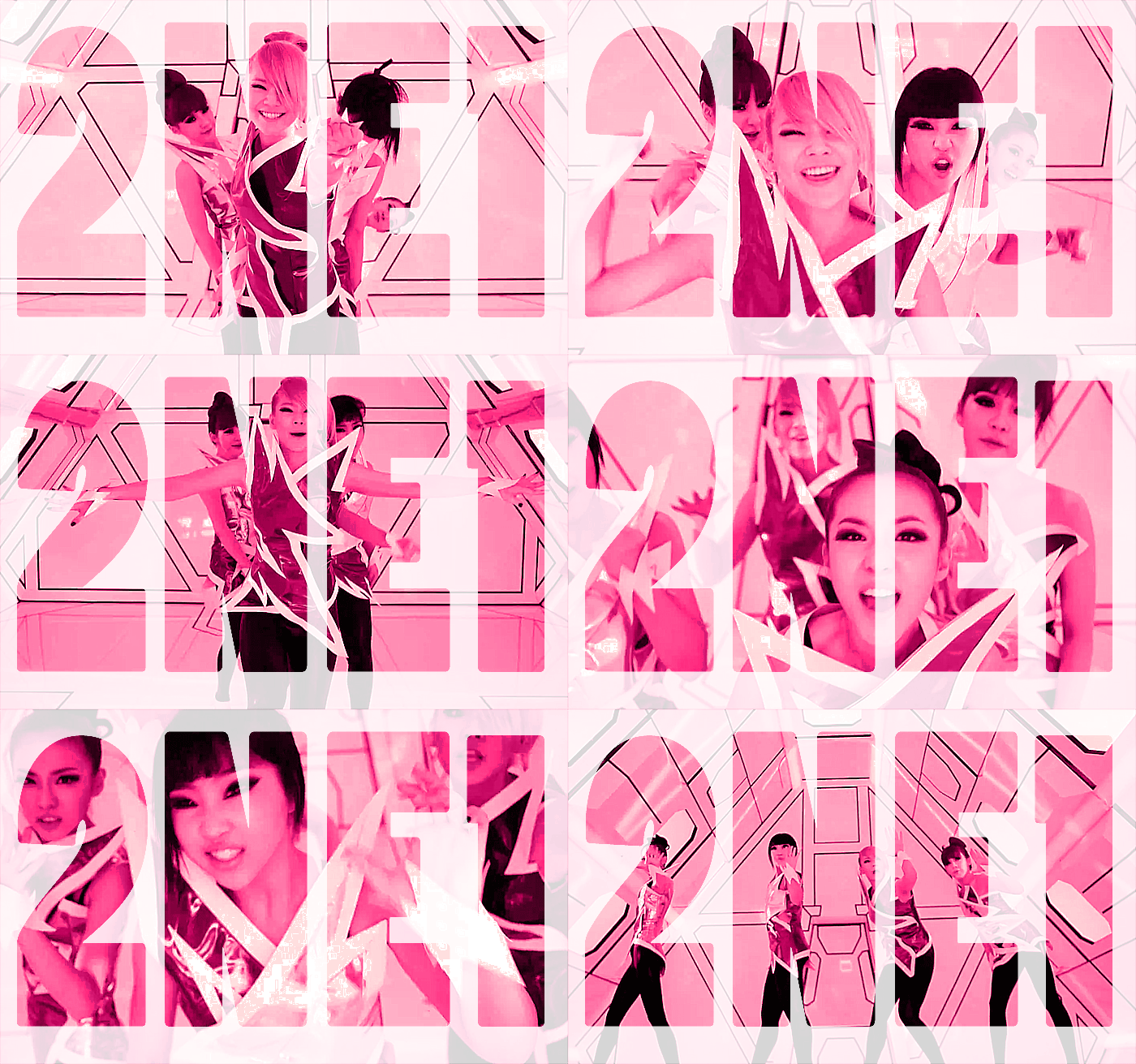
Simple, isn't it?! You can improvise the steps number 10-13. Good luck!
Labels: Art, Freebies, Fun, Graphics/GIFs, Hobbies, Photoshop, Tutorial, Web Designing